How to Create Engaging Video Content
Master video engagement. Hook psychology, retention editing, audio fundamentals, and techniques that separate watched videos from scrolled-past.

Quick answers
Yes. AI handles the time-consuming parts — generating hooks, writing captions, drafting scripts, and planning your week — while you focus on creative decisions that require your voice and judgment.
Not if the tool learns your voice. Generic AI produces generic output. Tools like MySocial AI Content Studio analyze your existing content and performance data so every draft sounds like you, not a template.
Hooks (from 12+ proven formats), captions, video scripts, thumbnails, content calendars, topic research, repurposed assets across platforms, and translations into 25+ languages — essentially everything except filming.
ChatGPT is great for general writing. MySocial AI Content Studio is purpose-built for creators — connected to your analytics, trained on your voice, and generates platform-native content shaped by what performs in your niche.
Every creator hits the same wall: you know you need to post consistently, but the writing takes longer than the filming. Captions, hooks, scripts, descriptions, hashtags — the text side of content creation eats hours that could go toward actually creating.
Most creators don’t lose to bad ideas. They lose to bad execution — weak hooks the algorithm never tests, content that sounds slightly “off,” and posts that die after 24 hours because they’re never repurposed.
AI doesn’t replace your creativity. It eliminates the blank-page problem and the execution gap. The creators using AI well aren’t producing worse content — they’re producing more of it, faster, without burning out.
5x
Faster first drafts with AI
200k+
Hooks in MySocial's trained database
25+
Languages supported
The mistake most creators make: paste a topic into ChatGPT and publish whatever comes out. That produces generic content from a generic tool. The right approach uses AI that’s connected to your analytics and trained on your voice — inside a structured workflow.
Step 01
Before writing, scan what's trending in your niche — which topics are gaining traction, what formats are winning, and where gaps exist that you can fill. MySocial's Topic Intelligence tracks this automatically and surfaces original angles based on your analytics.
Step 02
Instead of guessing what to post, let AI read your analytics, find your top performers, map your topic gaps, and turn it into a 7-day plan. Ask: 'What should I post this week?' — and get a focus topic, 3 winning angles, a repurposing list, and a post schedule in minutes.
Step 03
A YouTube script is not an Instagram caption. Generate hooks trained on 200k+ top-performing videos (12 proven formats like Curiosity Gap and Negative Hook), platform-tuned captions, retention-optimized scripts, and thumbnail concepts — all shaped by what converts in your niche.
Step 04
Paste a link to your best video — or pick a top performer from your analytics. AI repurposes it into a TikTok script, Instagram carousel, YouTube Short, LinkedIn post, and thread. One piece of content becomes five platform-native assets in your voice.
Step 05
Track everything in one calendar. See published posts, manage upcoming content, and save ideas for later. When you have an empty slot, the AI agent suggests the perfect post to fill it — based on what's working in your niche right now. Pair this with a content calendar strategy for maximum consistency.
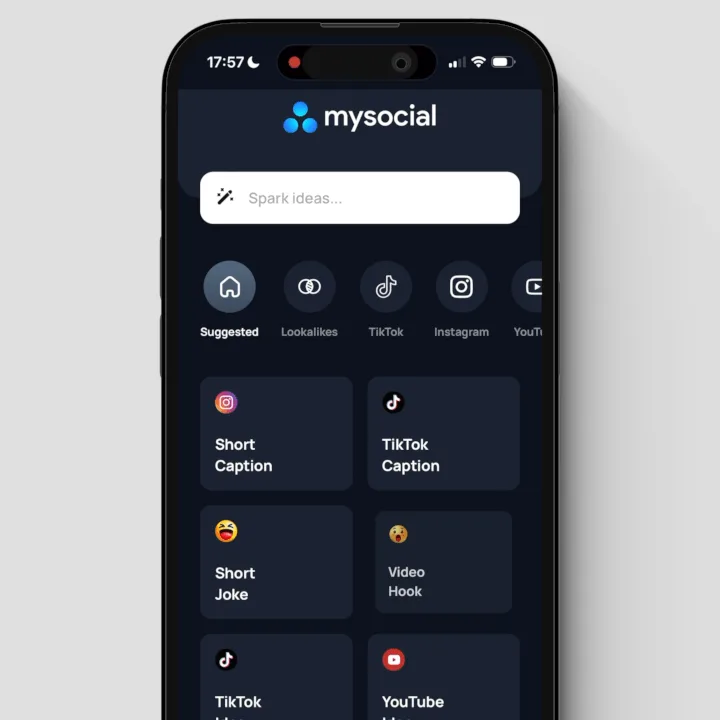
Most AI tools work from a blank prompt — no context about your audience, your analytics, or your voice. You type a topic, it generates a template, and you spend 20 minutes editing it to sound like you.
The difference with analytics-connected AI: every output starts from data about what’s already working for you.
Generic AI tools
Blank prompt — no context about you
Generic templates for everyone
You edit for 20 min to sound like you
No idea what’s working in your niche
Analytics-connected AI
Reads your analytics and performance data
Learns your voice from your existing content
Outputs sound like you from the first generation
Trained on what’s winning in your specific niche
This isn’t a theoretical difference. When your AI knows that your audience engages 3x more with story-driven hooks than list-based hooks — it generates story-driven hooks by default. When it knows your tone is casual and direct — it doesn’t produce corporate copy you have to rewrite.
Every output is platform-native, written in your voice, and shaped by what performs in your niche.
Studio-ready assets
Hooks that stop the scroll
Trained on 200k+ top-performing videos. Choose from 12 proven formats — Curiosity Gap, Negative Hook, Contrarian Take, and more.
Captions that get saved
In your voice. Built for the platform. Shaped by what converts in your niche. Instagram, TikTok, LinkedIn, and X — each format optimized.
Scripts that retain viewers
Turn your hooks into full scripts structured for high retention — optimized body content, pattern interrupts, and strong CTAs built in.
Thumbnails that earn the click
Designed from proven visual patterns in your niche. More clicks, more views — no more guessing what works.
Repurposed assets from one win
Paste a video link → get a TikTok script, IG carousel, YouTube Short, LinkedIn post, and thread. One piece of content, 10 platform-native assets.
Go global in your voice
Generate content in Arabic, Spanish, German, French, Portuguese, Swedish, and 25+ more — keeping your unique tone, not just translating words.
The gap between “AI-assisted” and “AI-generated” is everything. Audiences can tell when content is written by a machine. These rules keep your content authentic.
Copy-paste and publish without reading it out loud
Use a blank-prompt tool with no context about your audience or analytics
Let AI decide your opinions — it has none, so the content reads as neutral filler
Same prompt for every platform — Instagram captions and YouTube scripts need different structures
Use AI that learns your voice from your existing content and performance data
Generate, then refine — add your personal stories, opinions, and phrasing
Specify platform, audience, and tone in every prompt for tailored output
Let analytics inform the output — what's working for your audience should shape what AI produces
Better prompts produce better drafts. If you’re new to prompt engineering, the core principle is simple: the more context you give the AI (your niche, audience, tone, format, examples), the less editing you’ll need to do.
For a full library of ready-to-use prompts, check our AI prompts for content creators guide.
Start by identifying your biggest time sink. Is it writing captions? Brainstorming topics? Planning your week? Use AI for that one thing first, get comfortable, then expand.
The full workflow — topic intelligence → weekly planning → asset generation → repurposing → publishing — turns what used to be hours of scattered work into a structured system you can run in minutes. Combine it with a solid 30-day content plan and you’ll produce more content with less effort — while keeping every piece authentic to your voice.
Your voice. Proven formats. Every platform. In seconds. MySocial's AI Content Studio is connected to your analytics and trained on your content.
Try AI Content StudioAI & Content Creation Workflows
Related Posts
Master video engagement. Hook psychology, retention editing, audio fundamentals, and techniques that separate watched videos from scrolled-past.
Build a repeatable content system. The pillar framework, platform-specific formats, batch workflows, and techniques for consistent growth.
The prompt framework that turns generic AI output into usable content. Copy-paste prompts for captions, scripts, hooks, and more.